

Command-Line Arguments
Volume Mounts
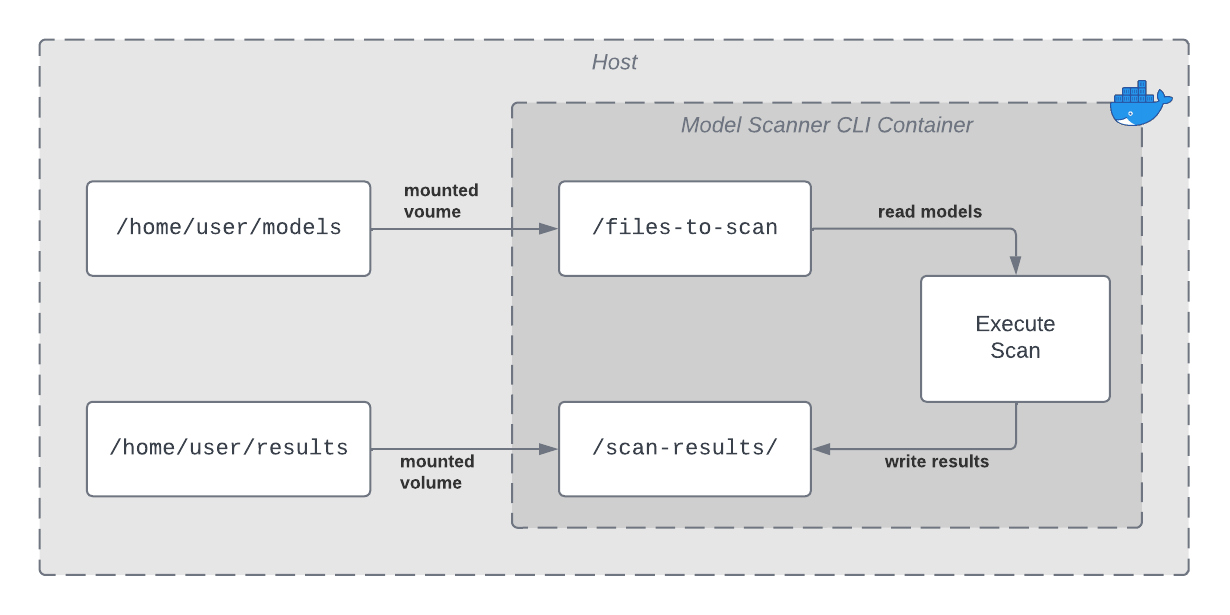
- AI Supply Chain Security CLI requires its input - the model(s) to be scanned - to be made available to the running Docker container through a mounted volume.
- AI Supply Chain Security CLI can optionally write scan results to a file within a mounted volume.
- All file paths provided in command-line argument to the container are with respect to the container’s file system, not the local file system.
- See the Docker documentation for more information.
Example
- Suppose that the models to be scanned are located on the local machine in
/home/user/models. - Supply Chain CLI’s scan results should be output to the local machine in
/home/user/results. - This example runs the 26.4.0 Supply Chain CLI image. Change the Supply Chain CLI version if you want to pull a different Supply Chain version. Example: change
26.4.0to26.5.0.
In this case, volume mounts could be specified as follows:
macOS
Linux
Windows
Runtime Security Version
This example runs the latest Supply Chain CLI image. Change the Supply Chain CLI version if you want to pull a different Supply Chain version.
Supply Chain CLI
Input
Glob Syntax
Some of the input arguments for the Supply Chain CLI allow the user to specify one or more globs to use for matching certain file path patterns. The following tokens can be used within globs to specify matching patterns:
-
*: matches any (possibly empty) sequence of non-special characters- Special characters are
*, ?,\\, and[
- Special characters are
-
?: matches any single non-special character